


Learn to use Instagram settings to make your account private
What to Know
- To make your profile private, tap your profile icon, then tap Menu > Settings > Privacy. In the Account Privacy section, switch on Private Account.
- To make your profile public again, go back to the Account Privacy menu and switch off Private Account.
If you choose to set your Instagram account to private, only your followers will be able to see your posts, and any hashtags you include will not appear in search results. Here’s how this works on the Instagram app for Android and iOS devices.
Make Your Instagram Account Private
To make your profile private on Instagram using the iPhone app:
1.Tap your profile icon at the bottom right of the screen.
2.Tap the Menu icon (three horizontal lines) at the top right.
3.Select Settings.
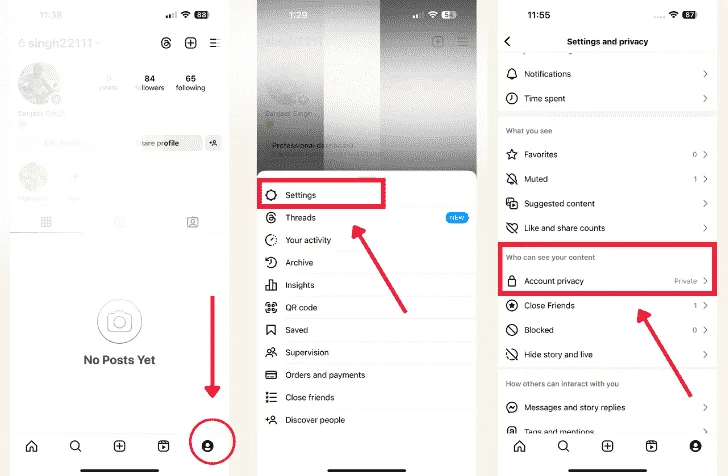
4.Tap Privacy.
5.Toggle on Private Account under Account Privacy.

NOTE:- You can choose to keep only certain photos private on your Instagram account by hiding select pictures. This option can be found in the photo menu.
Making Your Profile Public
To make your profile visible again, simply go to the Account Privacy screen and toggle off Private Account. If you’re 16 or under when you create your Instagram, your profile will be set to private by default. You’ll need to manually turn off the privacy setting to let everyone see your feed.
Related post:- How To Update Instagram on iOS and Android
FAQ
Q: What happens if I tag a user or add a hashtag to one of my Instagram posts when my profile is set to private?
A: When your profile is private, only your followers can see your posts, including those where you tag other users or use hashtags. If someone doesn’t follow you, they won’t be able to see these posts, even if they’re tagged or contain hashtags.
Q: Can I share an Instagram post on other social network sites if my profile is set to private?
A: Yes, you can share a post to other social networks, but it will be publicly accessible as a standalone post. People who view it on those networks can click the Instagram permalink to see the full post. However, they won’t be able to view your other content unless they follow you on Instagram.
Q: If someone follows me while my profile is private, can they see my posts?
A: No, they can’t see your posts until you approve their follow request. When someone tries to follow you, they send a follow request which you can approve or deny. Only after you approve their request can they see your posts.
Q: How can I stop someone from following me if I no longer want them as a follower?
A: If you no longer want someone to follow you, you can block them. Go to their profile, tap the three dots in the top-right corner, and select “Block User.” This will remove them from your followers. If the account is behaving inappropriately, consider reporting it as well.