

Find Instagram in your phone’s app store, then tap Update to get the latest version
What to Know
- Open App Store (iOS) or Play Store (Android) > search for Instagram > tap it > Update.
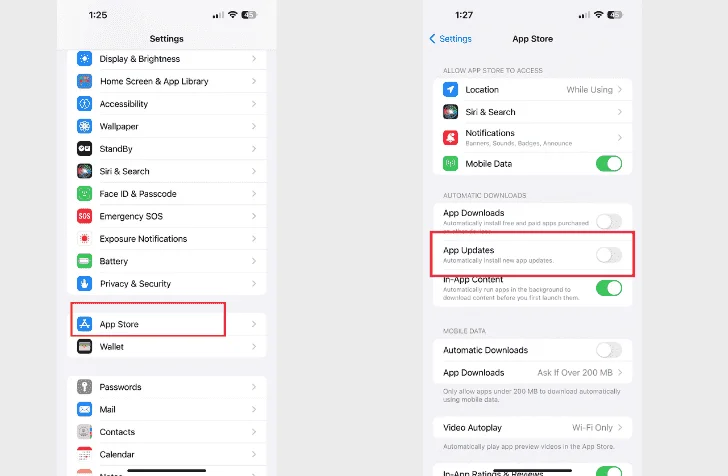
- Turn on automatic app updates to keep Instagram updated automatically.
This guide provides instructions on how to update your Instagram app on both iOS and Android devices. Keeping your Instagram app up to date ensures that you have access to the newest features and that the app runs smoothly.
How to Update the Instagram App on iOS
To update Instagram on your iPhone or iPad, locate the Update button in the App Store. Follow these steps:
1.Open the App Store app.
2.Tap on Search at the bottom.
3.Use the search box at the top to find Instagram, then tap on the app when it appears in the results.
4.Tap Update to begin downloading and installing the newest version of Instagram. You can close the App Store; the update will continue in the background.
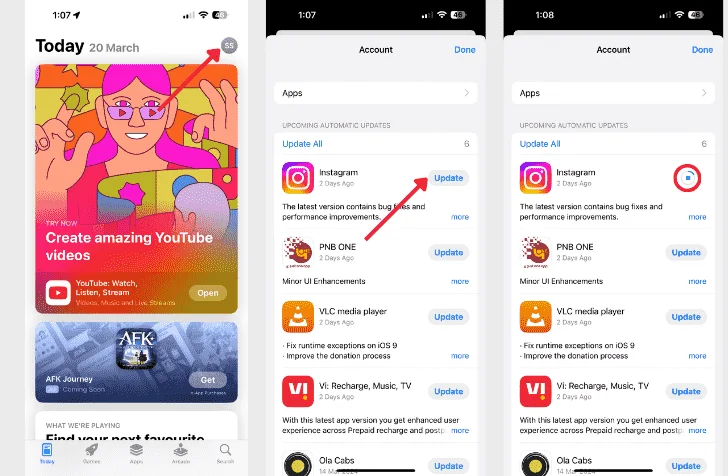
- Note:-If your Instagram app is already updated, the button will display “Open.” If you don’t have Instagram installed, the button will show “Get,” which you can tap to download the app. If you had previously offloaded the app, you’ll see a cloud button to re-download it.
5.Once the update is complete, the button will change to say “Open.” Simply tap it to launch Instagram.
- Tip:-For consistent updates, we suggest enabling automatic app updates on your iPhone for Instagram. This way, you won’t need to manually follow these steps in the future.
How to Update Instagram on Android
To update Instagram on Android, follow these steps, which are similar to iOS:
1.Open the Play Store app on your Android device.
2.Go to the Apps tab and use the search box at the top to find Instagram. Tap on it when it appears in the search results.
3.Tap on the “Update” button to initiate the update process.
- Note :-If the button displays “Open” instead, it means that your Instagram app is already up to date. The “Install” button indicates that the app is not currently installed on your device.
4.Wait for the app to finish updating, then tap “Open” to begin using Instagram.
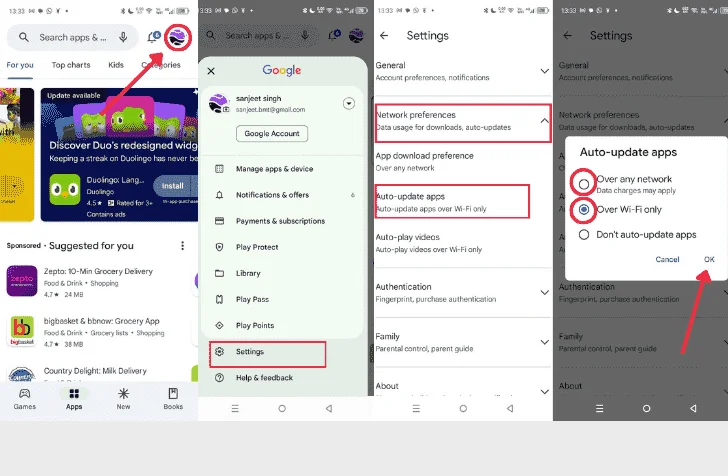
Tips: – Enable automatic app updates to avoid the need for manual updates in the future.
FAQ
Q1. How can I change my Instagram password?
Ans. To change your password on Instagram, navigate to the login screen and tap “Forgot password.” Enter your email address, phone number, or username, and select “Send login link.” Check the email or phone number linked to your account for a password reset link and follow the provided instructions.
Q2. How can I delete my Instagram account?
Ans. To permanently delete your Instagram account, access the Account Deletion page through a web browser, and log in if required. Select a reason for deleting your account, enter your password, and click “Permanently delete my account.”
Q3. How do I hide likes on Instagram posts?
Ans. To hide likes on other people’s Instagram posts, go to your Profile > Menu > Settings > Privacy > Posts > Hide Like and View Counts. To hide likes on your own posts, tap the three dots above your picture > Hide like count.